QGIS 4) calculate specific land use area
- Seunghye Baek

- Feb 26, 2020
- 1 min read
Updated: Mar 1, 2020
1. Find land id number that I need->
+여기서 각 하천으로 K빗물이 흐르는 집수면적도 확인할수 있음
Download landuse map from both two sites
헉... 2010말 파일은 삐뚤삐뚤하게 업로드되니까 2000년 말 자료를 사용하기.
중분류로 받았음
2. Check the meaning of landuse colors here ->
3. Merge raster files
When I merge several raster files I lose the color.
- so, before merge do this ; click raster layer -> save as rendered image
-merge file.
레스터파일 병합했을때 회색되면 rendered image로 저장하고 병합해.
- clipping with mask layer tool
네모로 병합된 파일을 포항 폴리곤이랑 겹쳐서 잘라. 자르는 파일도 rendered image file 로 저장되어 있는 파일 넣어야 색 안바뀜
4. Vectorize specific color area of raster file
-transform raster to polygon
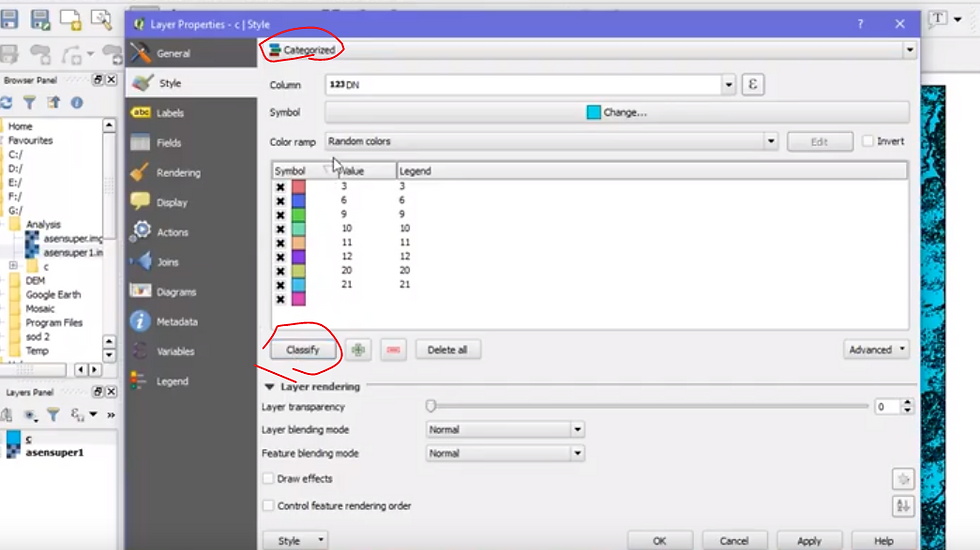
-click polygonized file layer -> property -> style ->click categorized -> click object column name -> click classify
어짜피 새로 저장하면 색깔바뀌니까 그림 안필요하면 할필요가 없음..
5. extract specific number area with property table
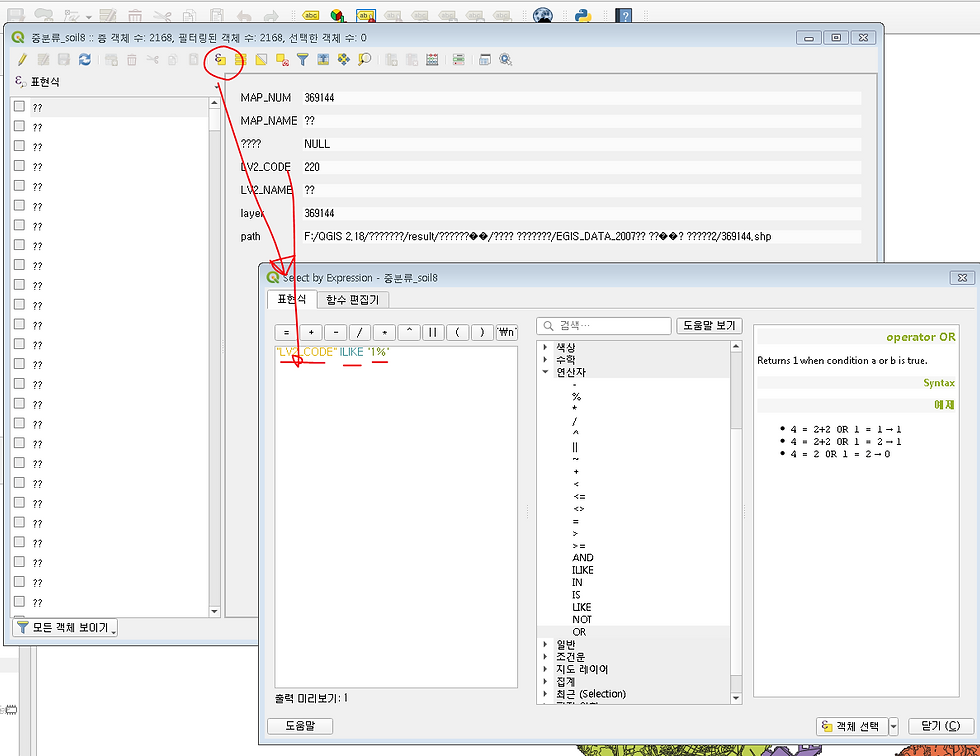
go to property table -> expression dialog -> write down this ; "LV2_CODE" ILIKE '1%'
than you can get values start with 1~(in this file 1~ means urban area)
or if you want to selet multi numbers write like this ;"LV2_CODE" ILIKE '2%' OR "LV2_CODE" ILIKE '4%'OR "LV2_CODE" ILIKE '5%'OR "LV2_CODE" ILIKE '6%'
표현식 추출사진
plus tip - Make grid which covers
specific area
plugin mmqgis -> click mmqgis -> create -> create grid layer
vector tab -> research tool -> select with location -> click intersect -> proceed


Comments